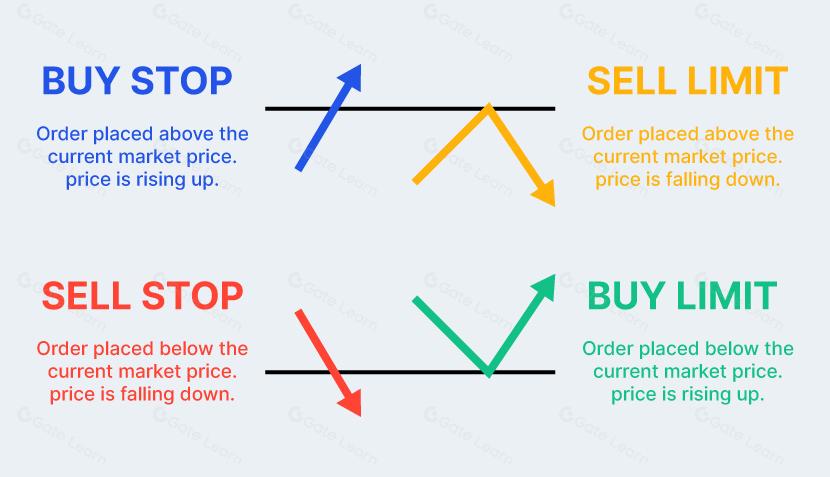
Preparation Before Setting Pending Orders
Confirm the Quote Precision and Minimum Distance of the Trading Instrument
Before setting pending orders on theMT4orMT5platform, the first step is to confirm the contract specifications of the trading instrument. Different instruments vary in quote precision, or decimal places, and the minimum distance for pending orders (Stop Level). These parameters directly affect whether the platform will accept the pending order price.
How to view contract specifications: in the "Market Watch" window, right-click the trading instrument and select "Specification". In the pop-up window, the following key parameters can be found:
Quote digits: determines the minimum precision of the pending order price, such as 5 decimal places or 3 decimal places
Stop Level: the minimum point distance that must be maintained between the pending order price and the current market price
Minimum and maximum trade size: ensures that the order volume is within the permitted range
If the distance between the pending order price and the current market price is smaller than the Stop Level, the platform will reject the pending order and display an "invalid stops" message. This restriction is designed to prevent pending orders from being placed too close to the market price and causing frequent invalid triggering.
Identify Key Price Levels
The core of pending order setup is determining a reasonable trigger price. Common methods for identifying price levels include:
Support and resistance levels: marked using previous highs and lows, horizontal lines, or trendlines
Round-number levels: such as 1.1000 or 1.1050 in EUR/USD, which often have psychological support or resistance significance
Moving averages: such as the 50-day or 200-day moving average, where prices may react when approaching these levels
Fibonacci retracement levels: commonly used retracement ratios include 38.2%, 50%, and 61.8%
| Pending Order Type | Trigger Price Setting | Limit Price Setting, MT5 Composite Order | Applicable Scenario |
|---|---|---|---|
| Buy Limit | Below the current Ask price | Not applicable | Expecting a rebound after a pullback, buying on dips |
| Sell Limit | Above the current Bid price | Not applicable | Expecting a decline after a rebound, selling on rallies |
| Buy Stop | Above the current Ask price | Not applicable | Expecting a breakout above resistance, buying momentum |
| Sell Stop | Below the current Bid price | Not applicable | Expecting a breakdown below support, selling momentum |
| Buy Stop Limit | Above the current Ask price | Below the trigger price | Waiting for a pullback after an upside breakout before buying |
| Sell Stop Limit | Below the current Bid price | Above the trigger price | Waiting for a rebound after a downside breakout before selling |
Operational Process for Four Basic Pending Orders
Setup Steps for Buy Limit
Select "New Order" on the platform toolbar, or press the F9 shortcut key to open the order window
In the "Type" drop-down menu, select "Pending Order"
Select "Buy Limit" as the pending order type
Enter the desired buy price in the "Price" field, which must be below the current Ask price and meet the Stop Level requirement
Set the trade size
Set stop-loss and take-profit prices as needed
Click "Place" to confirm
Setup Steps for Sell Limit
Open the order window and select "Pending Order"
Select "Sell Limit" as the pending order type
Enter the desired sell price in the "Price" field, which must be above the current Bid price
Set the trade size
Set stop-loss and take-profit prices as needed
Click "Place" to confirm
Setup Steps for Buy Stop
Open the order window and select "Pending Order"
Select "Buy Stop" as the pending order type
Enter the trigger price in the "Price" field, which must be above the current Ask price
Set the trade size
Set stop-loss and take-profit prices as needed
Click "Place" to confirm
Setup Steps for Sell Stop
Open the order window and select "Pending Order"
Select "Sell Stop" as the pending order type
Enter the trigger price in the "Price" field, which must be below the current Bid price
Set the trade size
Set stop-loss and take-profit prices as needed
Click "Place" to confirm
How to Set MT5 Composite Pending Orders
Setup Steps for Buy Stop Limit
Open the order window in the MT5 platform and select "Pending Order"
Select "Buy Stop Limit" as the pending order type
Set the trigger price, or Stop Price: it must be above the current Ask price
Set the Limit Price: it must be below the trigger price
Set the trade size
Set stop-loss and take-profit prices as needed
Select the pending order expiry, such as "Day" or "Valid until specified date"
Click "Place" to confirm
After setup is completed, the platform will display the Buy Stop Limit order in the order list. When the Ask price rises to the trigger price, the order status automatically changes to a Buy Limit order, with the limit price set as the previously entered Limit Price. If the price then falls back to that limit price, the buy order will be executed.
Setup Steps for Sell Stop Limit
Open the order window in the MT5 platform and select "Pending Order"
Select "Sell Stop Limit" as the pending order type
Set the trigger price, or Stop Price: it must be below the current Bid price
Set the Limit Price: it must be above the trigger price
Set the trade size
Set stop-loss and take-profit prices as needed
Select the pending order expiry
Click "Place" to confirm
| Parameter | Buy Stop Limit | Sell Stop Limit | Important Notes |
|---|---|---|---|
| Trigger price direction | Set above Ask | Set below Bid | Must meet the Stop Level minimum distance |
| Limit price direction | Below the trigger price | Above the trigger price | The distance between the limit price and trigger price affects execution probability |
| Conversion after triggering | Buy Limit order | Sell Limit order | The converted limit order follows limit execution rules |
| Non-execution risk | Not executed if price does not pull back to the limit price | Not executed if price does not rebound to the limit price | The wider the distance, the lower the probability of execution |
Risk Control in Pending Order Management
Slippage and Gap Risk
Slippage refers to the difference between the actual execution price of an order and the expected price. In pending order execution, slippage mainly appears in stop-type pending orders, such as Buy Stop and Sell Stop, because these orders are executed at market price after being triggered. Limit-type pending orders, such as Buy Limit and Sell Limit, are constrained by a price ceiling or floor and do not produce adverse slippage under normal market conditions.
A gap refers to a discontinuous price movement between two trading sessions. In the forex market, the most common gap occurs at the Monday opening after the weekend market closure. The impact of gaps on pending order execution differs by order type:
Limit-type pending orders are executed at a price favorable to the trader after a gap and do not create adverse slippage
Stop-type pending orders are executed at market price after a gap and may generate significant slippage losses
Composite orders, such as Buy Stop Limit and Sell Stop Limit, may be triggered in the first step after a gap, but the second-step limit order will not execute if price does not retrace
Setting Pending Order Expiry
The MT5 platform supports the following pending order expiry options:
Day: the pending order remains valid until the end of the current trading day and is automatically cancelled if not triggered during the day
Good Till Cancelled, GTC: the pending order remains valid until it is triggered or manually cancelled
Good Till Date: the trader sets the expiry time manually
When choosing an expiry period, it should be determined based on the timeframe of the trading strategy. Short-term traders usually use Day orders to avoid overnight gap risk. Medium- and long-term traders may choose GTC or a specified date to wait for price to reach the target level over a longer period.
| Risk Type | Trigger Cause | Affected Order Types | Avoidance Method |
|---|---|---|---|
| Slippage | Stop-type pending orders are executed at market price after triggering | Buy Stop, Sell Stop | Use limit-type pending orders or composite pending orders instead |
| Weekend gap | Unexpected events during market closure cause the opening price to deviate sharply | All pending orders left over the weekend | Cancel untriggered pending orders before Friday market close |
| Insufficient liquidity | Low-liquidity periods, such as early Asian session or session transition times | All pending order types | Avoid setting pending orders during low-liquidity periods |
| Composite order not executed | Price does not retrace to the limit price | Buy Stop Limit, Sell Stop Limit | Set a reasonable distance between the trigger price and the limit price |
| Stop Level restriction | Pending order price is too close to the market price | All pending order types | Check the instrument specifications and ensure the minimum distance is met |
Making money in the markets requires discipline, patience, and strict control of loss size and loss frequency.
Pending Order FAQ
How do you set a Buy Stop Limit order in MT5?
The steps are as follows: open the MT5 platform, press F9 or click "New Order" to open the order window. In "Type", select "Pending Order", and in the pending order type drop-down menu, select "Buy Stop Limit". Enter the trigger price in the "Price" field, which must be above the current Ask price, and enter the limit price in the "Limit Price" field, which must be below the trigger price. Set the trade size, and optionally enter stop-loss and take-profit levels. After selecting the expiry period, click "Place". After submission, the order can be viewed in the "Trade" tab of the "Toolbox". When the Ask price rises to the trigger price, the order automatically converts into a Buy Limit order; when the price subsequently falls back to the limit level, the buy order is executed.
What expiry options are available for pending orders?
On the MT4 platform, pending order expiry options are usually "Day" or "manual cancellation", meaning the pending order either automatically expires at the end of the trading day or remains valid until manually deleted by the trader. The MT5 platform provides more flexible options: Day, GTC, or Good Till Cancelled, and Good Till Date. Traders should choose the appropriate expiry period based on their trading strategy. If the price is expected to reach the target level in the short term, Day validity may be enough; if waiting for a medium- to long-term breakout or pullback, GTC or a specific expiry date may be selected.
How will pending orders held over the weekend be executed at the Monday open?
During the weekend market closure, all untriggered pending orders remain in the platform system. When the market opens on Monday, prices may gap due to economic events or political changes that occurred over the weekend. If the opening price skips over the pending order’s trigger price, the execution rule depends on the order type: limit-type pending orders, such as Buy Limit and Sell Limit, are executed at a price favorable to the trader because the limit mechanism ensures that the execution price is not worse than the preset level. Stop-type pending orders, such as Buy Stop and Sell Stop, are executed at market price, and the actual execution price may be the first available price after the market opens, which can differ significantly from the trigger price. To avoid weekend gap risk, traders can manually cancel untriggered stop-type pending orders before Friday market close.
How can multiple pending orders be set at the same time to respond to different market movements?
Trading platforms allow multiple pending orders to exist at the same time. One common approach is to set opposite pending order combinations around the current price. For example, set a Buy Stop above the current price, expecting an upside breakout, and set a Sell Stop below the current price, expecting a downside breakdown. After one of the pending orders is triggered, the trader can manually cancel the other to avoid reverse risk. Another common combination is setting a Buy Limit at support, buying on dips, and a Sell Limit at resistance, selling on rallies, which is suitable for an expected range-bound market. It should be noted that when multiple pending orders exist at the same time, the margin requirements of each order may be calculated cumulatively, so the account should have sufficient funds.